VisionScope Checkout API
A server-to-server API that lets merchants accept card payments by redirecting shoppers to a hosted VisionScope checkout page. Results are delivered asynchronously via signed webhooks.
1. Overview
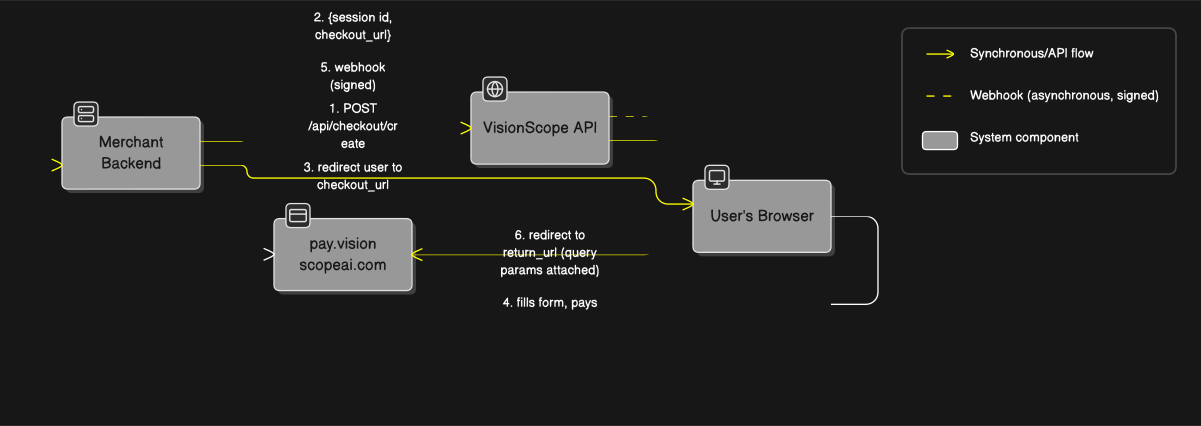
Three things the merchant must build:
- A backend call to
POST /api/checkout/create - A redirect from the merchant site to the returned
checkout_url - A webhook endpoint that verifies signatures and updates the merchant database
2. Base URL & Authentication
| Environment | Base URL |
|---|---|
| Development | https://api-dev.visionscopeai.com |
| Production | contact VisionScope |
Every request must include your API key:
X-API-Key: vsk_live_xxxxxxxxxxxxxxxxxxxxxxxxxxxxxxxx3. Create a Checkout Session
Request headers
Content-Type: application/json
X-API-Key: vsk_live_xxxxxxxxxxxxxxxxxxxxxxxxxxxxxxxx
Request body
| Field | Type | Required | Description |
|---|---|---|---|
amount | number | yes | Major units (e.g. 10.0 = €10.00) |
currency | string | yes | 3-letter ISO code (EUR, USD, GBP…) |
webhook_url | string | yes | Public HTTPS URL that will receive payment events |
webhook_secret | string | yes | Shared secret to sign webhooks. Use ≥ 32 random bytes |
return_url | string | yes | URL the user is redirected to when checkout completes |
Example
curl -X POST https://api-dev.visionscopeai.com/api/checkout/create \
  -H "Content-Type: application/json" \
  -H "X-API-Key: vsk_live_xxxxxxxxxxxxxxxxxxxxxxxxxxxxxxxx" \
  -d '{
    "amount": 10.00,
    "currency": "EUR",
    "webhook_url": "https://yourmerchant.com/webhook",
    "webhook_secret": "a1b2c3d4e5f6...",
    "return_url": "https://yourmerchant.com/return"
  }'
Successful response (HTTP 200)
{
  "success": true,
  "data": {
    "session_id": "cs_mo8ly3a8_67d5e72898f11888",
    "checkout_url": "https://pay.visionscopeai.com/checkout/cs_mo8ly3a8_67d5e72898f11888"
  }
}
Errors
| HTTP | Body | Meaning |
|---|---|---|
| 400 | { "error": "amount and currency are required" } | Missing required fields |
| 401 | { "error": "Invalid API key" } | X-API-Key missing or invalid |
| 502 | { "error": "Upstream checkout API unreachable" } | Transient — retry with backoff |
4. Show the Checkout to the User
Once you have checkout_url, there are three ways to present the VisionScope-hosted checkout form (SSL, PCI-compliant) to your shopper. Pick whichever fits your UX best — they all resolve the payment the same way.
session_id in your database before redirecting or embedding so you can correlate the webhook back to the order.Option A — server-side redirect
Simplest — user is redirected from your backend straight to VisionScope's hosted page.
res.redirect(303, data.checkout_url);Option B — client-side via sessionStorage
Keeps the checkout token out of the URL bar, nginx access logs, and browser history. Pairs well with Option C below.
// on your site, after receiving checkout_url from your backend:
sessionStorage.setItem('checkout_url', data.checkout_url);
window.location.href = '/checkout.html';

// on /checkout.html:
const url = sessionStorage.getItem('checkout_url');
sessionStorage.removeItem('checkout_url');  // single-use
document.getElementById('iframe').src = url;
Option C — embed as an <iframe> (recommended for branded UX)
Keeps the shopper on your domain. You control the page chrome (header, footer, back button) around the payment form. The checkout_url can be loaded into any iframe on any origin — VisionScope's checkout page sets permissive framing headers specifically for this integration.
<!-- checkout.html on your site -->
<!doctype html>
<html>
  <body style="margin:0">
    <iframe
      id="checkoutFrame"
      title="Secure Checkout"
      sandbox="allow-scripts allow-forms allow-same-origin allow-top-navigation allow-popups"
      referrerpolicy="no-referrer-when-downgrade"
      style="width:100%; height:100vh; border:0; display:block;"
    ></iframe>
    <script>
      const url = sessionStorage.getItem('checkout_url');
      sessionStorage.removeItem('checkout_url');
      if (url) document.getElementById('checkoutFrame').src = url;
      else location.href = '/';   // no token — send them home
    </script>
  </body>
</html>
Sandbox attribute — what each token does and why it matters
| Token | Required? | Why |
|---|---|---|
allow-scripts | yes | Lets the checkout page's JavaScript run (form validation, API calls) |
allow-forms | yes | Lets the user submit the card form |
allow-same-origin | yes | Needed so the checkout page can read its own cookies / localStorage |
allow-top-navigation | yes | Critical for 3DS. Bank 3DS challenge pages refuse to load inside iframes — VisionScope breaks out to top-level for 3DS, and this token permits that navigation |
allow-popups | yes | Some gateways open a popup for their challenge flow |
allow-top-navigation or allow-popups. Without them, 3DS-required cards (most EU / UK cards) will silently fail inside your iframe.Iframe height & layout
The checkout form is long (customer details + billing address + card). Give the iframe full viewport height (height: 100vh) or use a scroll container. The checkout page itself is responsive and renders cleanly from ~320px wide up to desktop widths.
Trade-offs
| Option A: redirect | Option B: sessionStorage + redirect | Option C: iframe | |
|---|---|---|---|
| User stays on your domain | ❌ | ❌ | ✅ |
| Checkout URL in address bar | Visible | Hidden | Hidden |
| Branded header/footer | ❌ | ❌ | ✅ |
| 3DS compatibility | ✅ | ✅ | ✅ (requires sandbox tokens) |
| Setup complexity | Lowest | Low | Low |
| Return URL behavior | Normal redirect | Normal redirect | Iframe navigates to return URL; use allow-top-navigation to break out |
return_url. To break out of the iframe (so the user sees the return page full-screen), either (a) rely on allow-top-navigation and have the checkout page break out automatically, or (b) listen for a postMessage event and navigate the top window yourself. See the reference implementation for details.5. Webhooks
After the user attempts payment, VisionScope sends a signed POST to your webhook_url. You must verify the signature before trusting the payload.
5.1 Headers
| Header | Value |
|---|---|
Content-Type | application/json |
X-Signature | Hex HMAC-SHA256 of the raw body, keyed by webhook_secret |
X-Timestamp | ISO-8601 time when the webhook was signed |
5.2 Event payloads
payment.success
{
  "event": "payment.success",
  "session_id": "cs_mo8ly3a8_67d5e72898f11888",
  "status": "paid",
  "amount": 10,
  "currency": "EUR",
  "order_id": "VS-1776767335185-54D482EA",
  "paid_at": "2026-04-21T13:18:14.650Z"
}
payment.failed
{
  "event": "payment.failed",
  "session_id": "cs_mo8ly3a8_67d5e72898f11888",
  "status": "failed",
  "amount": 10,
  "currency": "EUR",
  "order_id": "VS-1776767335185-54D482EA",
  "reason": "Payment declined after 3DS",
  "failed_at": "2026-04-21T13:18:14.650Z"
}
5.3 Signature verification (Node.js)
import express from 'express';
import crypto from 'crypto';

const app = express();
const WEBHOOK_SECRET = process.env.WEBHOOK_SECRET;

app.post('/webhook',
  express.raw({ type: 'application/json' }),
  (req, res) => {
    const signature = req.header('X-Signature');
    const rawBody   = req.body;  // Buffer

    if (!signature) return res.status(400).json({ error: 'missing signature' });

    const expected = crypto
      .createHmac('sha256', WEBHOOK_SECRET)
      .update(rawBody)
      .digest('hex');

    const sigBuf = Buffer.from(signature, 'hex');
    const expBuf = Buffer.from(expected, 'hex');

    if (sigBuf.length !== expBuf.length ||
        !crypto.timingSafeEqual(sigBuf, expBuf)) {
      return res.status(401).json({ error: 'invalid signature' });
    }

    const payload = JSON.parse(rawBody.toString('utf8'));
    // ── update your database here ──
    res.status(200).json({ received: true });
  });
5.4 Response expectations
- Return HTTP 2xx within 10 seconds to acknowledge.
- Any non-2xx or timeout triggers a retry with exponential backoff.
- Process idempotently — the same event may arrive more than once. Dedupe on
(session_id, event).
5.5 Timing
| Payment type | Webhook timing |
|---|---|
| Non-3DS, approved | ~2 seconds after charge |
| 3DS-required | After user completes 3DS (may be minutes) |
| Declined | ~10 seconds |
| Gateway timeout | Reconciled by background sync every 10 seconds |
6. Return URL
After the user finishes (success or failure), VisionScope redirects their browser to your return_url with these query params:
| Param | Values |
|---|---|
session_id | the session you created |
status | paid | failed |
order_id | VS-prefixed order ID (same as in the webhook) |
reason | only on failure — human-readable message |
https://yourmerchant.com/return?session_id=cs_mo8ly3a8_67d5e72898f11888&status=paid&order_id=VS-1776767335185-54D482EA7. End-to-End Example
From the reference caller-project:
7.1 Backend — proxy the create call
// server.js
import 'dotenv/config';
import express from 'express';

const {
  PORT = 5000,
  VISIONSCOPE_API_URL,    // https://api-dev.visionscopeai.com/api/checkout
  VISIONSCOPE_API_KEY,    // vsk_live_...
  WEBHOOK_PUBLIC_URL,     // https://yourmerchant.com/webhook
  WEBHOOK_SECRET,         // 64 hex chars
  RETURN_URL,             // https://yourmerchant.com/return
} = process.env;

const app = express();

app.post('/api/checkout', express.json(), async (req, res) => {
  const { amount, currency } = req.body;
  if (!amount || !currency) {
    return res.status(400).json({ error: 'amount and currency required' });
  }

  const r = await fetch(`${VISIONSCOPE_API_URL}/create`, {
    method: 'POST',
    headers: {
      'Content-Type': 'application/json',
      'X-API-Key': VISIONSCOPE_API_KEY,
    },
    body: JSON.stringify({
      amount,
      currency,
      webhook_url: WEBHOOK_PUBLIC_URL,
      webhook_secret: WEBHOOK_SECRET,
      return_url: RETURN_URL,
    }),
  });

  const data = await r.json();
  if (!r.ok || !data.success) return res.status(r.status).json(data);

  // persist data.data.session_id in your DB here
  res.json(data.data);
});
7.2 Frontend — redirect and return page
<!-- index.html -->
<button id="buy">Pay €10.00</button>
<script>
  document.getElementById('buy').onclick = async () => {
    const r = await fetch('/api/checkout', {
      method: 'POST',
      headers: { 'Content-Type': 'application/json' },
      body: JSON.stringify({ amount: 10.0, currency: 'EUR' }),
    });
    const data = await r.json();
    sessionStorage.setItem('checkout_url', data.checkout_url);
    location.href = '/checkout.html';
  };
</script>
<!-- return.html -->
<h1 id="status"></h1>
<script>
const p = new URLSearchParams(location.search);
document.getElementById('status').textContent =
p.get('status') === 'paid'
? 'Thank you!'
: `Payment failed: ${p.get('reason') || ''}`;
</script>8. Security Checklist
- HTTPS only for
webhook_urlandreturn_url. - API key stored server-side only — never in frontend code or git history.
webhook_secretis ≥ 32 random bytes (openssl rand -hex 32).- Verify
X-Signatureon every webhook usingcrypto.timingSafeEqual(not===). - Reject webhooks with bad signatures with HTTP 401.
- Idempotent handler — deduplicate on
(session_id, event). - Reply under 10 seconds — return 200 fast; do heavy work in a background queue.
- Treat return-URL query params as untrusted — verify final state via your DB (fed by webhooks).
- Rotate
webhook_secretperiodically. - Rate-limit your
/webhookendpoint.
9. Troubleshooting
| Symptom | Likely cause | Fix |
|---|---|---|
| 401 Invalid signature on webhook | HMAC computed over parsed JSON, not raw body | Use raw Buffer (see 5.3) |
| Payload mismatch vs signature | Wrong webhook_secret on your side | Create a new session with the correct secret |
| No webhook ever arrives | webhook_url not reachable from the internet | Use a public HTTPS URL (or a tunnel like ngrok in dev) |
| Redirect arrives, no webhook | User closed browser before gateway responded | Trust the webhook, not the redirect |
| Webhook fires twice | Retry or 3DS race | Make the handler idempotent |
| 502 on create | Transient upstream | Retry with exponential backoff (max 3) |
10. Support
For integration questions or incident reports: